
Table of contents:
I have run this exact exercise hundreds of times.
Export a clustering.
Open the CSV.
Stare at 5,000 keywords grouped into 2,605 clusters across 1,723 topic hubs, all the intent and funnel and SERP data sitting there, and then spend an afternoon trying to turn any of it into a plan I can actually execute on Monday.
3 hours later, the usual result. 12 items in a spreadsheet, four colours of highlighting, and a nagging feeling that something important is buried in row 1,847.
I co-founded Keyword Insights, the platform that produces the clustering export in the first place. The clustering itself is the hard bit. SERP-level similarity analysis across thousands of keywords is not something an LLM can fake. But the step after clustering, the one where you turn the export into a prioritised content calendar, has always been painfully manual.
So I built an MCP server that does it in about 3 minutes.
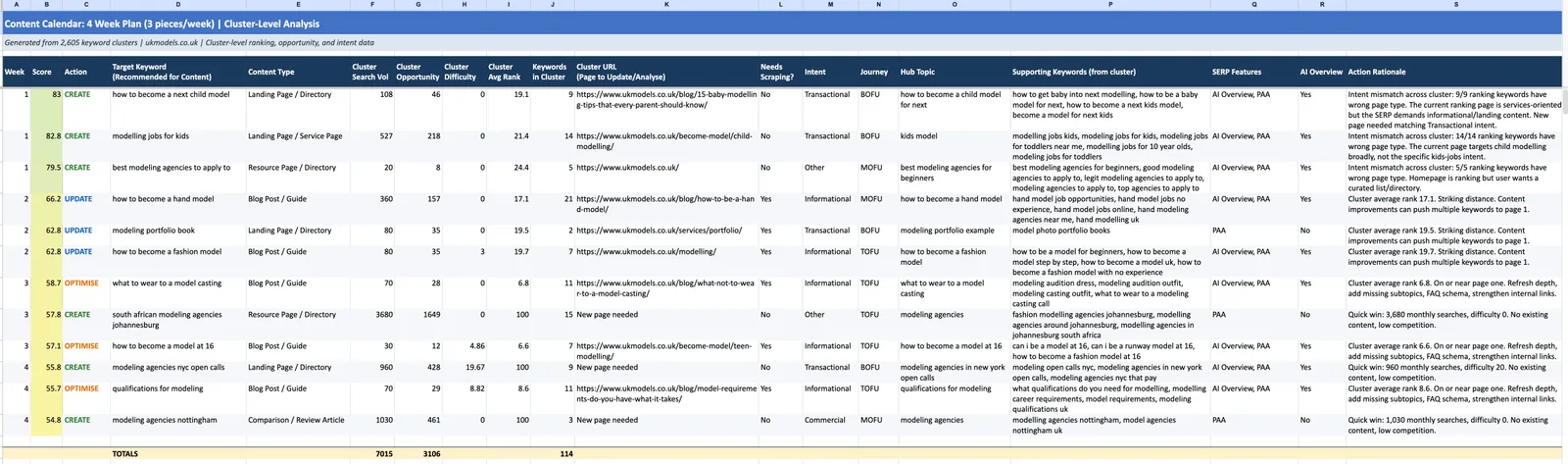
See for yourself. Sample output here.
How it works
4 steps, start to finish. The first one happens inside Keyword Insights. The other 3 happen in whichever AI tool you already use.
Step 1. Cluster. Run a clustering order on your keyword list inside Keyword Insights. SERP-similarity clustering at scale, intent mapping, funnel classification, content scoring, hub/spoke taxonomy. Export the results as CSV when it’s done.
Step 2. Parse. The MCP server reads your clustering CSV, validates the structure, compacts the top 500 clusters by opportunity, and enriches each one with derived columns like mismatch counts and hub sizes.
Step 3. Analyse. Your AI of choice (Claude, ChatGPT, Gemini, whatever you pay for already) receives the enriched cluster data alongside a detailed decision framework. It classifies every cluster, scores them, and builds a balanced calendar.
Step 4. Export. The server takes the calendar output and writes a formatted Excel workbook with 5 sheets, plus a flat CSV. Ready to hand to your content team or drop into ClickUp.
Steps 2 to 4 take about 3 minutes end to end. Step 1 depends on how big your keyword list is and whether you already have the clustering data sitting there (most KWI users do).
No API keys. No separate app. No hosting. You talk to whatever AI tool you already pay for and it handles the strategy.
Finding intent mismatches that spreadsheets miss
This is the use case that saves the most time, and the one I find most SEOs skip because it requires digging into every cluster individually.
An intent mismatch is when your site ranks for a cluster but the wrong page type is doing the ranking. Google wants a comparison article and you are ranking a product page. Google wants a how-to guide and you are ranking a category page. Technically you are ranking, but you are fighting the SERP instead of matching it, which is why you cap at position 14 instead of 3.
A spreadsheet will tell you “this cluster ranks at position 14.” It will not tell you why position 14 is the ceiling.
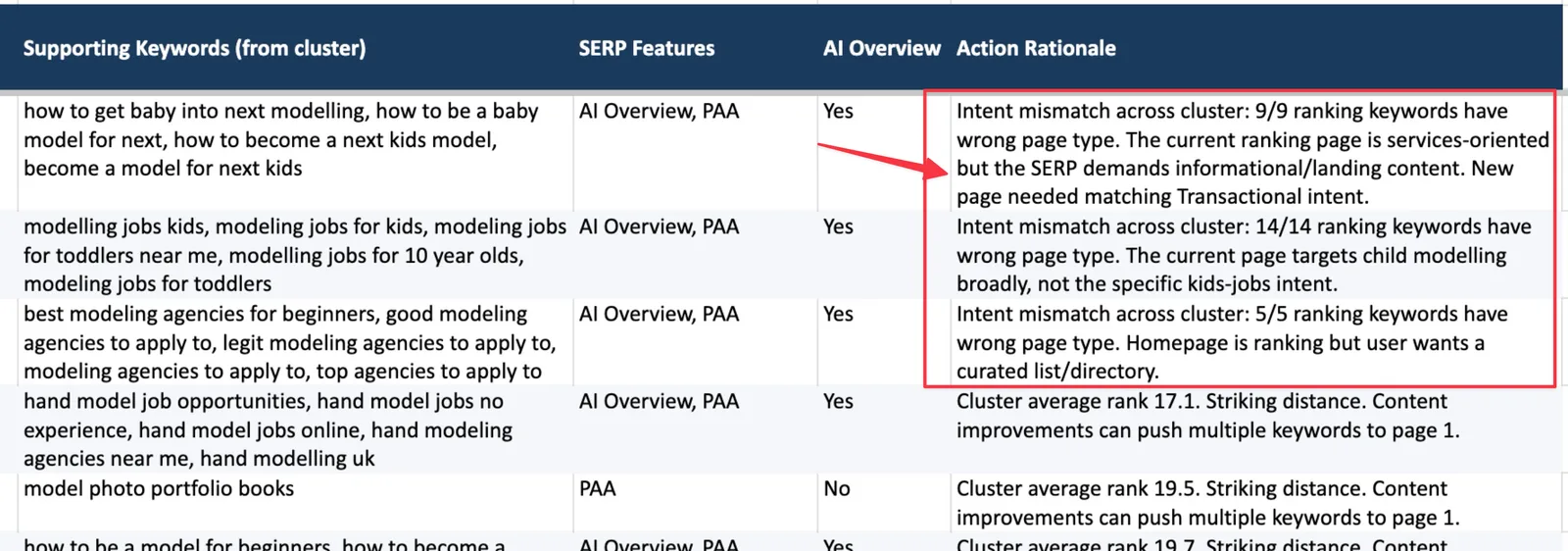
The MCP tool aggregates the is_intent_match field across every keyword in the cluster. If more than 60% of ranking keywords have the wrong page type, the cluster gets flagged as a CREATE with a specific reason written out.
One example from the test run. The modelling agency site ranks position 12 for a cluster around portfolio tips. A generic services page is doing the ranking. The SERP is dominated by how-to guides and blog content. 5 out of 7 ranking keywords flagged intent mismatch. The tool caught it and wrote: “Intent mismatch: 5/7 ranking keywords have wrong page type. New page needed matching Informational intent.”
A formula would have shown “position 12, decent volume.” The AI surfaces the actual strategic problem across 500 clusters in 3 minutes and puts it in week 1 of the calendar, because intent mismatches are actively hurting you every day they exist.
Spotting striking distance opportunities
Clusters where you rank between position 16 and 30. Close enough that a content refresh, some internal links, and better on-page signals could push them onto page one.
Every SEO knows to look at these. The question is what to actually do with them once you find them.
A spreadsheet gives you the position and the URL. You still have to decide whether the page is good enough to optimise or whether it needs a full rewrite. That judgement call usually requires opening each URL and reading the thing.
The tool uses the cluster_content_score field, a 0 to 1 measure of how well the existing content covers the topic, to make that call automatically. Content score above 0.4 with position between 16 and 30 means UPDATE. Sharpen what you have. Score below 0.4 means REWRITE, because the foundation is too weak to optimise on top of.
In the test run, 3 clusters landed in the striking distance band. 2 had decent content scores and got flagged as UPDATE for week 2. The third scored 0.18 and got flagged as REWRITE. A sorted spreadsheet would have grouped all 3 together and left the “polish vs start over” call to me.
Prioritisation that goes beyond gut feel
Every SEO has their own mental model for what to work on first. Some sort by volume, some by opportunity, some chase whatever the CEO asked about that morning.
Volume matters, and so does difficulty. Opportunity matters, but funnel stage changes the economics entirely. A BOFU cluster doing 200 monthly searches at a 5% conversion rate is worth more than a TOFU cluster doing 5,000 at 0.1%, and no single-column sort will ever surface that.
The tool scores every cluster from 0 to 100 using 6 weighted factors.
| Factor | Weight | Why it matters |
|---|---|---|
| Opportunity | 25% | Estimated additional traffic if rankings improve |
| Difficulty | 20% | Lower competition means faster results |
| Rank proximity | 20% | Closer to page 1 means less effort needed |
| Intent alignment | 15% | Mismatches get urgency points |
| Funnel stage | 10% | BOFU scores highest, because BOFU converts |
| Hub size | 10% | Clusters in large topic hubs build topical authority |
Multipliers kick in on top. Clusters with AI Overviews get a 15% boost because AI Overviews are the new page 1. Featured snippets add 10%. Clusters with 5 or more keywords add another 10% because they represent bigger content opportunities than single-keyword singletons.
A spreadsheet can sort by one column at a time. Maybe two with a helper formula and some pivot table gymnastics. This combines 6 signals, applies multipliers for SERP features, and returns a single score that accounts for business value, not just search volume.
Building a balanced calendar, not just a top-N list
This is the part people get wrong when they do it manually. Sort by priority score, take the top 12, call it a calendar. The result is a 12-row all-CREATE list that ignores the page currently sitting at position 18 which could be on page 1 next month with a 2-hour refresh.
The tool deliberately balances the mix.
Week 1 is reserved for intent mismatches because those are the most urgent. You are bleeding rankings every day the wrong page type is serving the query.
Week 2 goes to striking distance updates. Fastest path to traffic gains, lowest effort per point of return.
Week 3 mixes quick wins (high opportunity, low difficulty, no existing page) with page 1 optimisations (on-page improvements to clusters already ranking top 15).
Week 4 onwards picks up whatever balanced fill is left in the pipeline, with journey stage constraints applied.
The journey mix is a hard constraint, not a suggestion. If you set 45% TOFU, 30% MOFU, 25% BOFU, the calendar will hit those proportions within ±10%. A pure priority sort almost always skews toward informational content because that is where the search volume lives. The tool corrects this by swapping in higher-converting items from under-represented stages until the mix balances.
MAINTAIN (top 5 positions) and DEPRIORITISE (low opportunity, high difficulty) clusters never make the calendar. They end up in the backlog sheet, ranked and waiting for month 2.
Recommending content format from SERP data
The tool does not assume “write a blog post” for everything. It looks at what is actually ranking in the SERPs for each cluster and recommends format accordingly.
5 or more blog pages in the top 10 = blog post or guide. 4 or more product pages = landing page or service page. Commercial intent dominant = comparison or review article. Transactional intent = landing page or directory.
Format mismatch is one of the most common reasons content fails to rank. You write a 3,000 word guide for a query where Google shows product pages, and no amount of internal links will save you. Format follows SERP, not assumption.
3 things a spreadsheet can’t surface
Let me give you some real examples from the test run that no formula would have caught.
“This page is cannibalising itself.” A cluster about model measurements had the agency site ranking 2 different pages for keywords within the same cluster. One at position 22, one at position 35. Both with intent mismatches. A spreadsheet shows you 2 rows. The tool flags the whole cluster as a single CREATE opportunity and consolidates the URLs so the calendar has 1 item instead of 2 competing pieces fighting each other.
“This low-volume cluster is strategically important.” A BOFU cluster about booking a model for commercial shoots had 90 monthly searches. It would never make a top-N list sorted by volume. But it scored 78/100 because of high hub size (12 related clusters in the same topic hub), low difficulty, and BOFU funnel stage. The tool scheduled it in week 3 as a quick win. A volume sort would have buried it on page 8 of the backlog.
“These 5 clusters share a hub. Work on them together.” The tool groups clusters by hub and factors hub size into the priority score. When 5 clusters belong to the same topic hub, they score higher individually, because working on them as a batch builds topical authority for the whole group. A spreadsheet treats each cluster as an isolated item. The tool sees the topical map.
5 sheets, ready to use
The Excel output has 5 sheets.
Content Calendar. Your week by week plan across 19 columns. Week, priority score, action, target keyword, content type, cluster search volume, opportunity, difficulty, average rank, keywords in cluster, cluster URL, whether the page needs scraping, intent, journey stage, hub topic, supporting keywords, SERP features, AI Overview flag, and the full action rationale. Navy headers, alternating row shading, colour-coded actions (green CREATE, blue UPDATE, orange OPTIMISE, red REWRITE), colour scale on the priority column, TOTALS row at the bottom for search volume, opportunity, and keyword coverage.
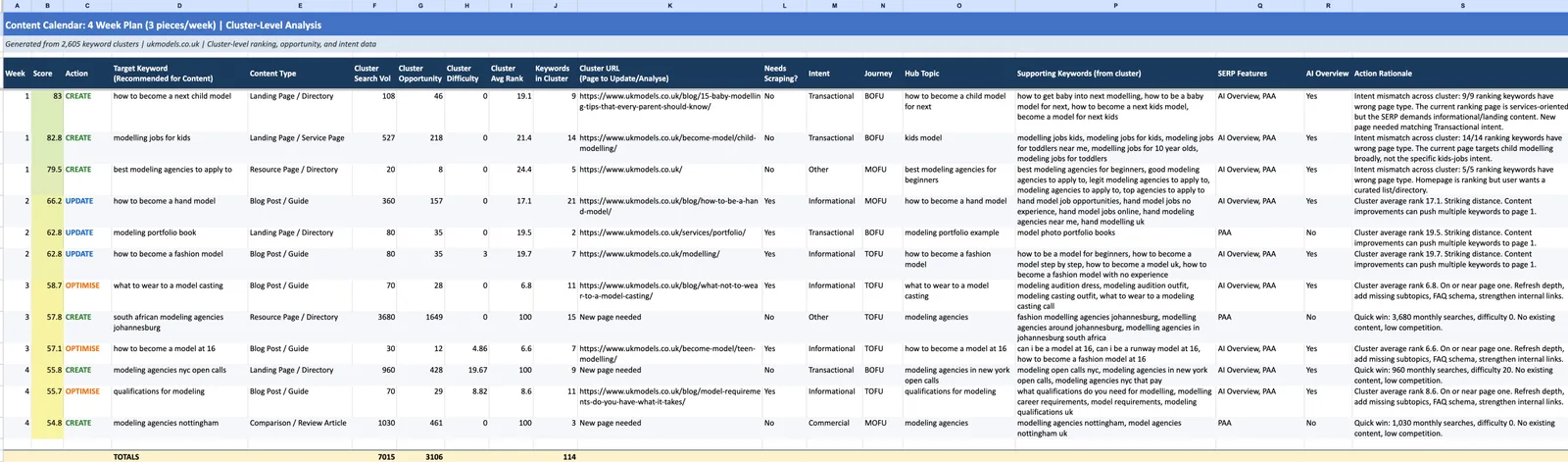
Gap Analysis Logic. A 4-step reference sheet that explains what to scrape and extract when an action is UPDATE, OPTIMISE, or REWRITE. Covers the existing page signals to pull, the competitor scraping to layer on top, the gap calculation that produces a subtopic and entity delta, and the final enhanced brief structure for the writing agent. Use it as documentation for whoever runs the scraping step downstream.
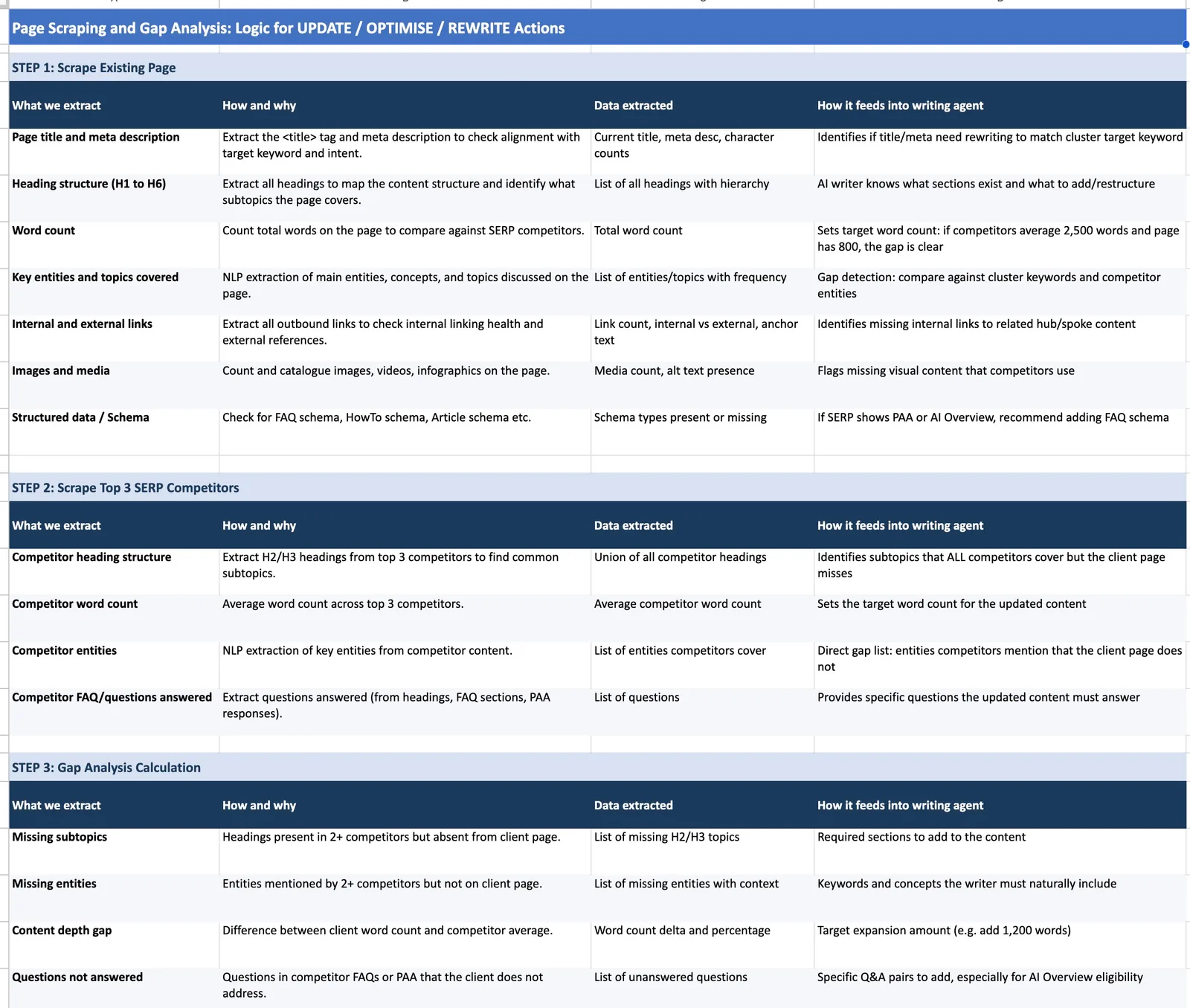
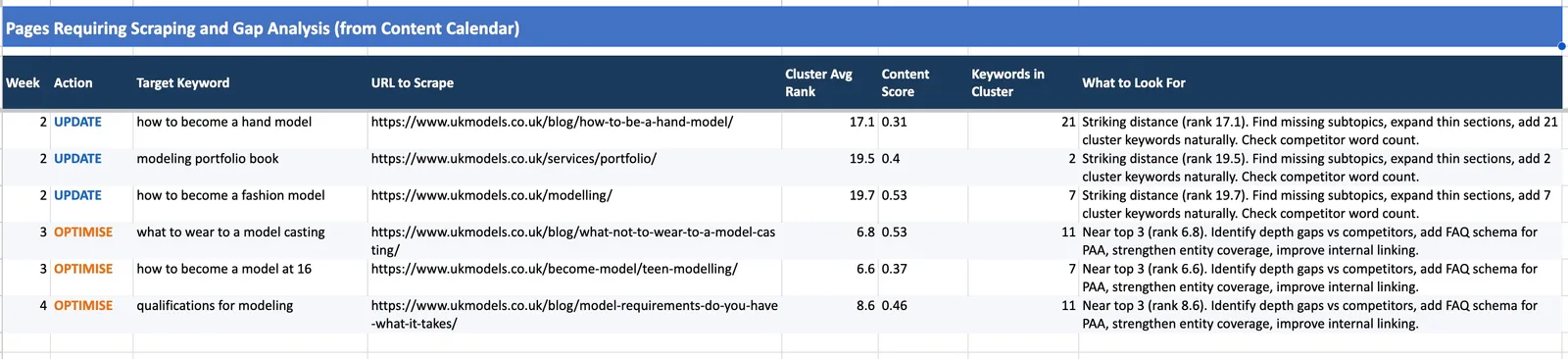
Pages to Scrape. Every UPDATE, OPTIMISE, and REWRITE item filtered out of the calendar with week, URL, cluster average rank, content score, keywords in cluster, and a concrete “What to Look For” instruction. For striking distance items, the instruction reads like “Striking distance (rank 17.1). Find missing subtopics, expand thin sections, add 21 cluster keywords naturally. Check competitor word count.” For near-top-3 items, it shifts to depth gaps, FAQ schema, and internal linking. Hand this list to your content team directly.
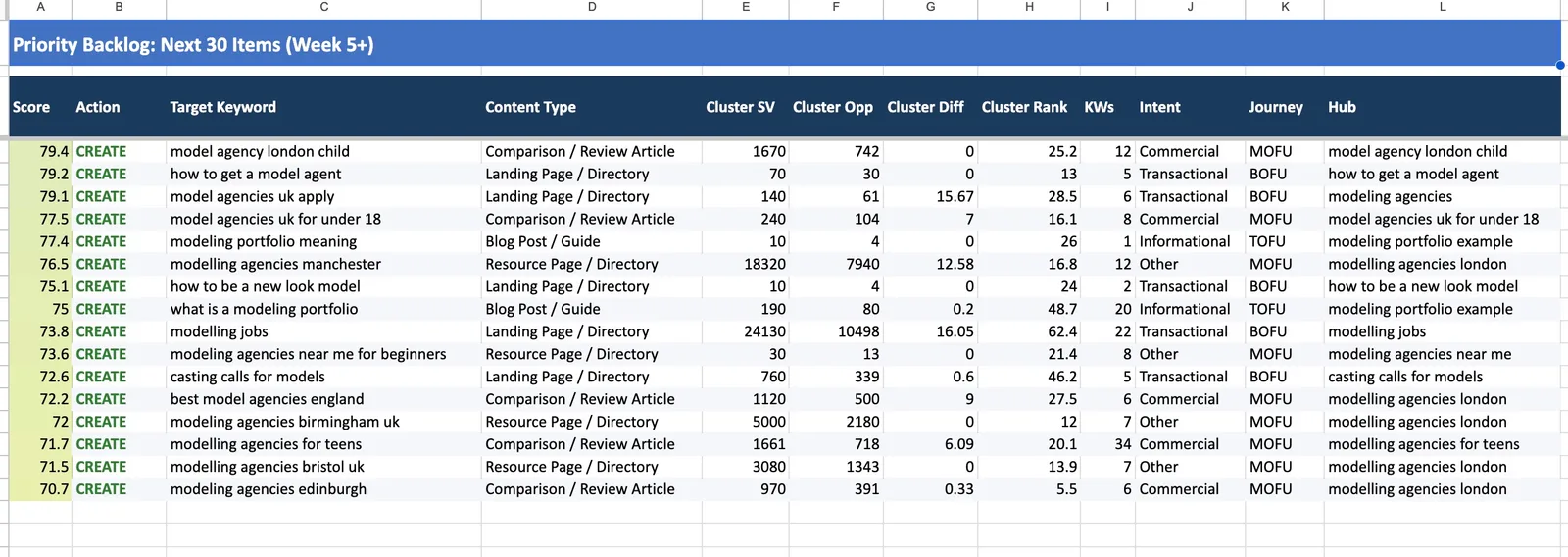
Priority Backlog. The next 30 clusters that didn’t make the calendar, ranked by priority score. Includes the Hub column so you can see which topical groupings are queuing up. Your pipeline for month 2.
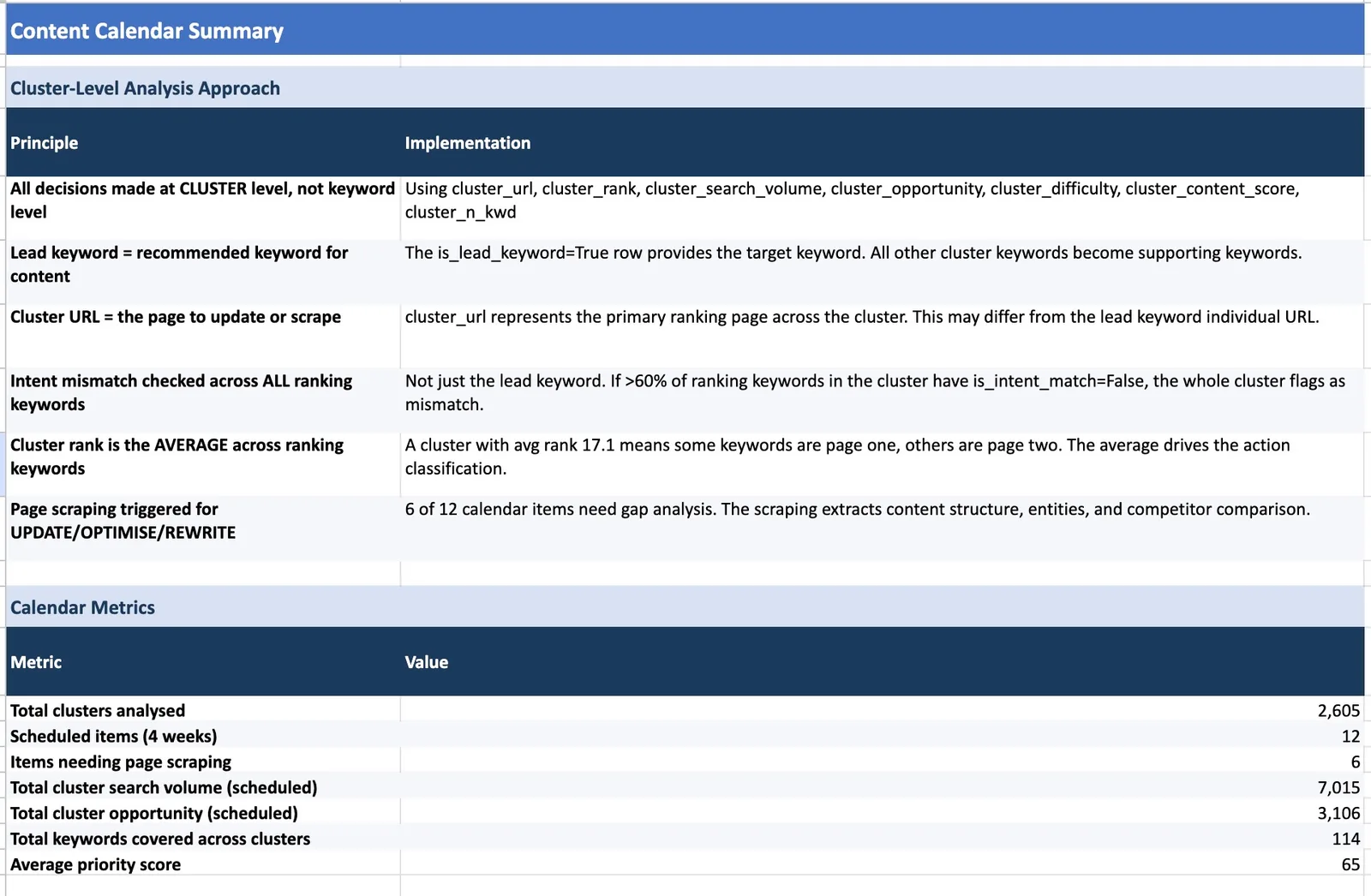
Summary. Two sections. First is Cluster-Level Analysis Approach, a table explaining the 6 principles the calendar was built on (cluster-level decisions not keyword-level, lead keyword as target, cluster URL as the page, intent mismatch checked across all ranking keywords, cluster rank as average, and page scraping triggers). Second is Calendar Metrics with total clusters analysed, scheduled items, items needing page scraping, total cluster search volume, opportunity, keywords covered, and average priority score.
A real test with real numbers
I ran this on the clustering export for a modelling agency site. The numbers.
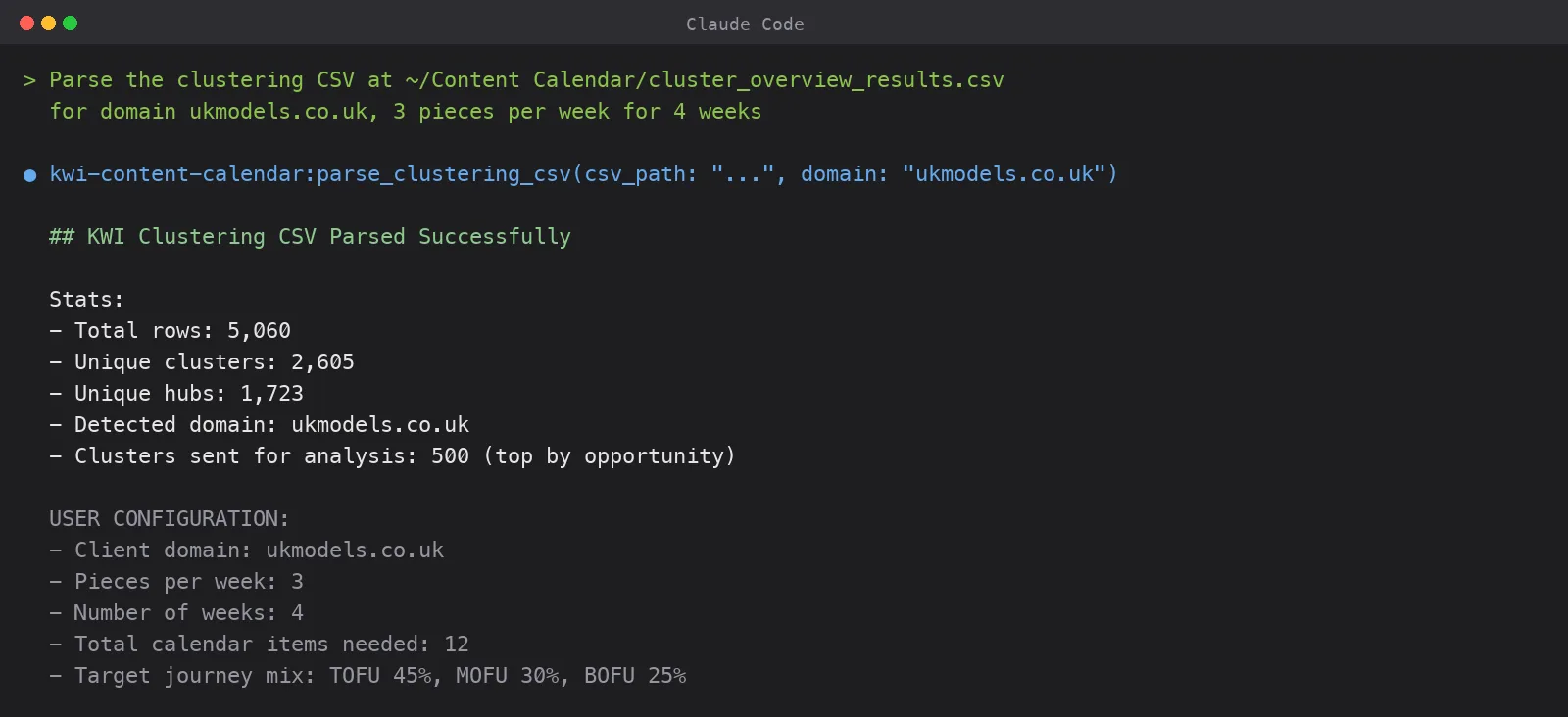
- 5,060 keywords in the input
- 2,605 clusters after SERP similarity analysis
- 1,723 topic hubs
- 41.5MB CSV file on disk
The MCP server compacted all that down to 500 lead-keyword rows (the top clusters by opportunity), enriched them with mismatch counts and hub sizes, and produced 132,917 characters of data. Roughly 33,000 tokens. Well inside any modern model’s context window.
Claude Sonnet analysed all 500 clusters in about 3 minutes. The output.
- 12 calendar items (3 per week for 4 weeks)
- 30 backlog items
- 4 intent mismatches flagged for week 1
- 3 striking distance clusters (positions 16 to 25) for week 2
- 5 quick wins for weeks 3 and 4
- Funnel mix landed at TOFU 42%, MOFU 33%, BOFU 25%. Target was 45/30/25, so within tolerance.
Total time from raw CSV to formatted Excel on my desktop. 3 minutes and 12 seconds.
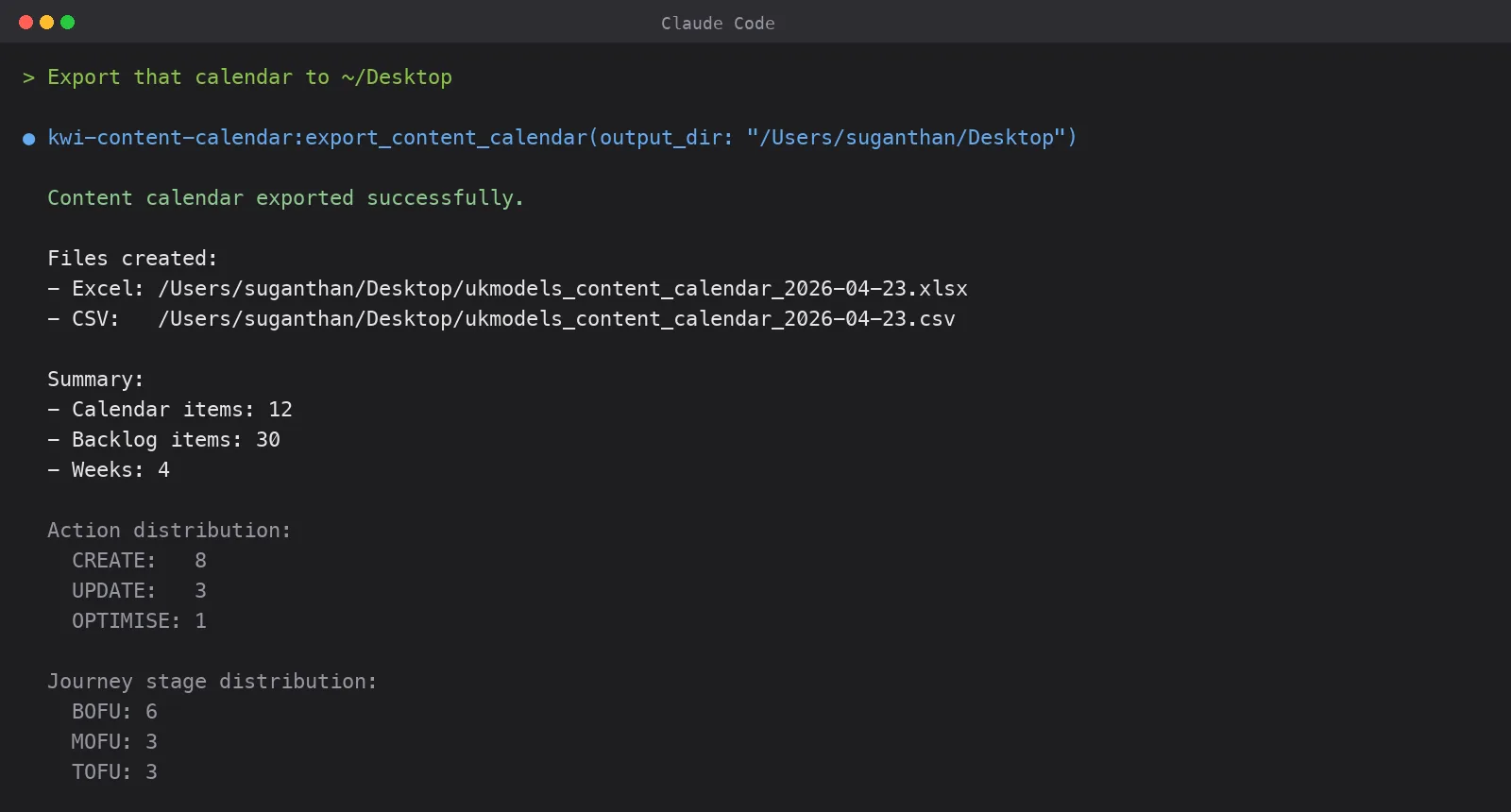
The before and after
| Step | Before (manual) | After (MCP server) |
|---|---|---|
| Find intent mismatches | Pivot table, filter, calculate ratios per cluster. 45 min+ | Automatic. Aggregated per cluster with 60% threshold |
| Identify striking distance | Sort, filter positions 16 to 30, cross-reference content scores. 30 min | Automatic. Classified as UPDATE or REWRITE based on content score |
| Score and prioritise | Gut feel, or build your own weighted formula. 60 min+ | 6-factor weighted composite score with SERP multipliers |
| Balance the calendar | Manual shuffling. Hope you didn’t over-index on one action type. 30 min | Automatic. Balanced by action type, funnel stage, and weekly sequencing |
| Format the deliverable | Build the spreadsheet yourself. 30 min | 5-sheet Excel with conditional formatting, ready to share with clients |
| Total | 3 to 4 hours | 3 minutes |
Why Claude can’t do this alone
There is a reason this tool needs a Keyword Insights clustering export and not just a keyword list.
Claude is genuinely good at analysis. Give it structured data and clear instructions and it will reason through hundreds of clusters methodically, without skipping the boring middle rows the way a human does after the first 90 minutes. But Claude cannot do SERP-based keyword clustering. Nobody’s LLM can.
Keyword clustering at the SERP level means checking which keywords share ranking URLs in the live search results. If “best running shoes” and “top running trainers” have 7 of the same URLs in their top 10, they belong in the same cluster. One content opportunity, not two.
Doing this properly requires hitting the Google SERP for every keyword on your list. For 5,000 keywords, that is 5,000 SERP lookups. Claude does not have access to live SERPs. Neither does ChatGPT, Gemini, or any other LLM. They will guess at semantic similarity, and they will get it wrong often enough to wreck your strategy, but they cannot verify against what Google actually ranks.
That is what Keyword Insights does. SERP-similarity clustering with intent mapping, funnel classification, content scoring, and hub/spoke taxonomy. The data that makes the content calendar possible.
The MCP server is the analysis layer. The clustering data is the foundation. You need both.
Chaining it with other workflows
The calendar output is structured data, which means you can pipe it into whatever else you already use.
Take a CREATE item, grab the keyword and intent, and use Claude to draft a brief with heading structure, target word count, and competitor analysis. The Keyword Insights Claude SEO skill can generate briefs directly from the cluster data, so you don’t have to babysit the hand-off.
For clients where you already have Search Console data flowing, connect the GSC MCP server and pull real click, impression, and CTR data for the URLs flagged as UPDATE and OPTIMISE. Validate the striking distance recommendations against what is actually happening in the wild.
The CSV export drops straight into ClickUp, Asana, Monday, or a Google Sheet. Each row becomes a task with priority, assigned week, and content type already filled in.
Re-export your clustering data monthly and run the tool again. What was striking distance last month might be page 1 this month, shifting from UPDATE to MAINTAIN. The calendar evolves as your rankings do.
Setup
The MCP server works with Claude Desktop, Claude Code, ChatGPT Desktop, Windsurf, Cursor, and Manus AI. Anything that speaks the Model Context Protocol.
Install
git clone https://github.com/Suganthan-Mohanadasan/kwi-content-calendar-mcp.git
cd kwi-content-calendar-mcp
npm install
npm run build
Claude Desktop
Add to ~/Library/Application Support/Claude/claude_desktop_config.json:
{
  "mcpServers": {
    "kwi-content-calendar": {
      "command": "node",
      "args": ["/path/to/kwi-content-calendar-mcp/dist/index.js"]
    }
  }
}
Claude Code
Add to ~/.claude.json under mcpServers:
{
  "kwi-content-calendar": {
    "type": "stdio",
    "command": "node",
    "args": ["/path/to/kwi-content-calendar-mcp/dist/index.js"]
  }
}
ChatGPT Desktop, Windsurf, or Cursor
Same pattern. Point the MCP config at dist/index.js using stdio transport. Each tool documents its own configuration path.
Restart your AI tool after adding the config.
Run it
Open your AI tool and say something like.
Parse the clustering CSV at ~/Downloads/cluster_results.csv for domain example.com, 3 pieces per week for 4 weeks
It calls parse_clustering_csv, analyses the data, and produces a JSON calendar. Then.
Export that calendar to ~/Desktop/
It writes the Excel and CSV files.
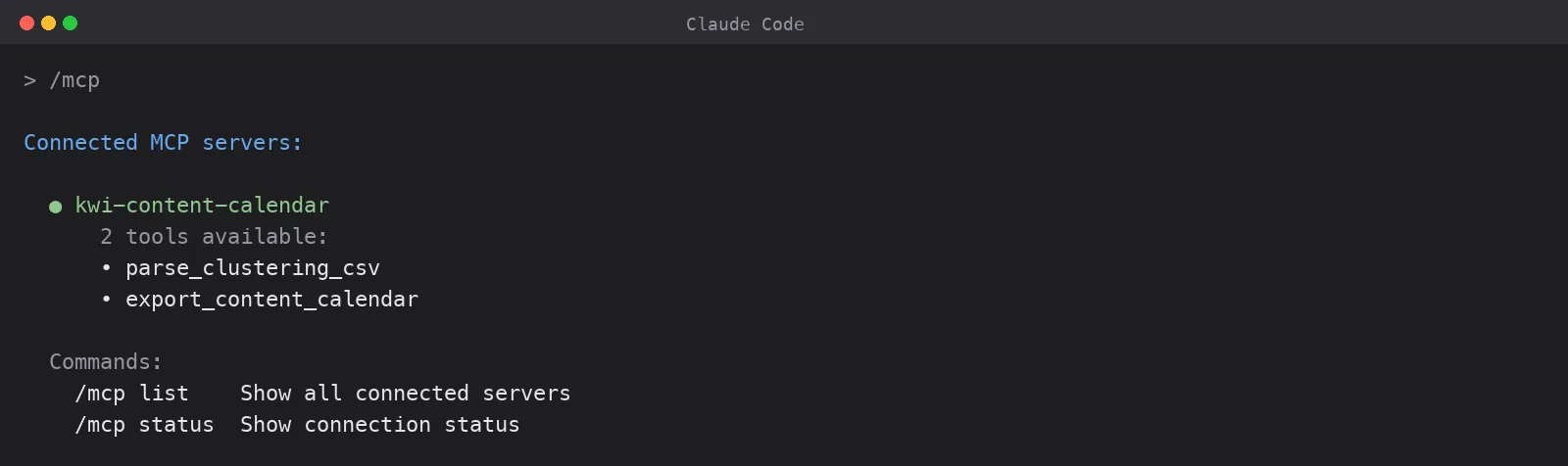
Parameters
| Parameter | Default | Description |
|---|---|---|
csv_path | required | Path to the KWI clustering CSV |
domain | required | Client domain |
pieces_per_week | 3 | Content pieces per week |
weeks | 4 | Calendar duration |
tofu_pct | 45 | TOFU target percentage |
mofu_pct | 30 | MOFU target percentage |
bofu_pct | 25 | BOFU target percentage |
max_clusters | 500 | Top N clusters by opportunity to analyse |
Getting a clustering CSV
If you don’t have a Keyword Insights account.
- Sign up at keywordinsights.ai
- Create a clustering project with your keyword list (There is a $1 trial that gives you 5000 credits.)
- Run the clustering.
- Export the results as CSV.
If you already have an account, you already have what you need. Export and go.
What it doesn’t do
This is strategy, not writing. The tool tells you what to create, update, or rewrite, and the specific reason each call was made. It does not write the article. That is a separate job, and the KWI Claude skill is the tool for it.
It also does not replace human judgement. The model has no idea you are sunsetting a product line next month, or that Q4 is your peak season, or that your CMO hates the word “ultimate.” Review the calendar before executing, which you were going to do anyway.
And it does not do the clustering itself. You need a Keyword Insights export to feed into it. Claude can’t cluster keywords by SERP similarity, which is the whole point of building this as a companion to the platform rather than a standalone tool.
What’s next
I’m building more MCP tools for the Keyword Insights platform. The content calendar was the obvious first one, because the gap between “I have my clusters” and “I know what to write this month” is where SEOs lose the most time for the least reason.
Source code is on GitHub. MIT licensed.
Changelog
v1.1.0 Expanded Excel export from 4 to 5 sheets. Added the Gap Analysis Logic documentation sheet. Pages to Scrape gained a “What to Look For” column with tailored scraping instructions per action. Priority Backlog gained a Hub column. Summary sheet rebuilt with a Cluster-Level Analysis Approach principles table and richer Calendar Metrics (total clusters analysed, items needing page scraping, total cluster search volume, keyword coverage, average priority score). export_content_calendar now accepts total_clusters, domain, pieces_per_week, and weeks metadata parameters so the Content Calendar title and Summary sheet render with accurate context.
v1.0.0 Initial release. 2 tools, parse_clustering_csv and export_content_calendar. Supports any MCP-compatible AI tool. Excel export with 4 formatted sheets.
Table of contents:
Start your 7 day
$1 trial
Sign up today for a $1 trial and enjoy access to 6000 keyword clustering credits, 3 Keyword discovery searches, 1 Content Brief and Pro versions of SERP Similarity, SERP Explorer.